Asp.Net Core API with Unit Testing

We will be using XUnit for unit testing an asp.net core api

Its a simple employee CRUD api and we will be writing basic unit tests to cover the api code.

It gives better understanding about how to test an API code

Below is the screenshot of all the test execution results
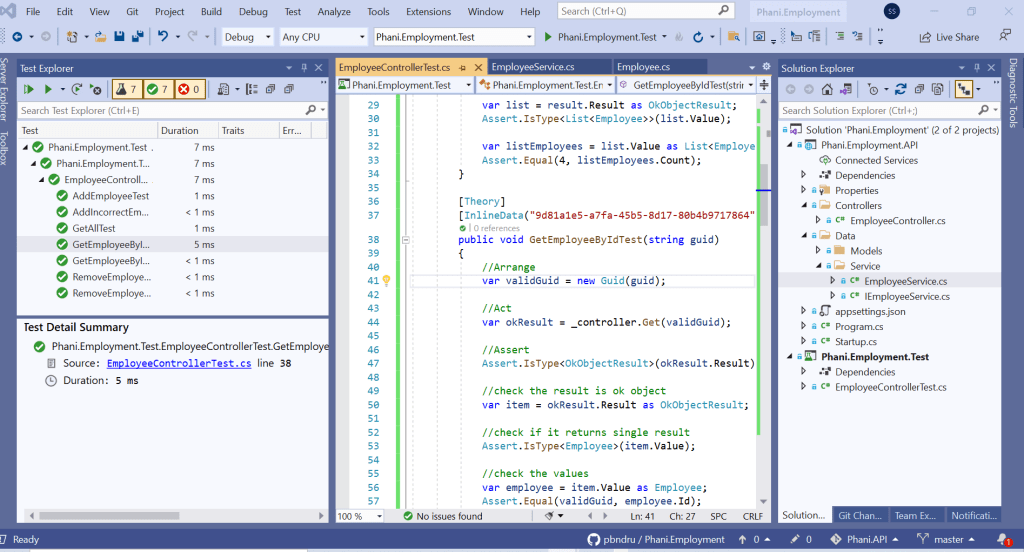
I will quickly go through the test code

EmployeeControllerTest is a test class where all the tests are done here

Here we will be testing Get all employees, Get employee by id, Adding employees, Removing employees.

Also we will be writing tests for incorrect results like get incorrect employee id and more scenarios. i added some comments which will be easy to understand.

InlineData is the one which will be using for passing as parameter to the object. We can have n number of parameters.

Act,Arrange,Assert are the test definitions about how to setup the object

We can write more tests here. Also we can use Mock, Fake and Stubs when testing network, real database. I will write a separate articl about this

A simple question people usually ask is how many tests i need to write and how can i make sure the tests cover the code?

No one can answer how many tests you need to write. It depends on the coverage result. So your code coverage needs to be atleast 80%. Usually more will be better.

Another question people usually ask is how can you know its less than 80% and i can checkin the code and complete my feature work?

After checkin the code , when the builds run at this stage it checks for code coverage. CI/CD can use tools like SonarQube to stop checkin the code before minimum coverage is achieved.

If you use TDD approach your code will be in better testable state.

Code can be found in my Github: https://github.com/pbndru/Phani.Employment

CQRS Mediator

By promoting loose coupling this pattern implements a mediator object where other objects communicate with it rather than each other

when to use cqrs meditor –

services calling each other – there is a box need to hit request and respone

cleanliness of large code bases

separate writes and reads -like ui team only wants to work on reads , so no impact on other teams using writes

code portability – box you can use

for simple crud – no need to use cqrs as proper abstractions resolve it, and its less complexity

Simply saying we need to remember 3 things

Mediator – middle dispatch stuff
Command Query – message which mediator know which handler to trigger
Handler

mediator tells which handler to pick based on query or command submitted
queries are for getting information about vehicles (in our app, we used vehicles)
commands are to do something with vehicles

Also, we need to use a pipe which is like a middleware for mediator (not a middleware for asp.net core) where we can do some stuff for request and response

Here in our app we have IPipelineBehavior – mediator interface which says do something with the message coming in and going out

There is other stuff we can add like caching in pipes, grab stuff from DB, entity framework transactions, mark queries as iqyeruable

Also we have request and responses. so we create a wrapper on top of them

there is also a mediator publish which we can use where it send notifications to bunch of handlers . which is like fire and forget

we can use this where we are using mediator.send() . so we can use mediator.publish

In our app, we have api project and services project.

in api , we need to configure our services in startup

        services.AddHttpContextAccessor();

        //register the pipe. we can add multiple pipes and executed by the order they added from top to bottom
        services.AddScoped(typeof(IPipelineBehavior<,>), typeof(AuthorizedIdPipe<,>));

        //register medieators. Get where assemblies of handlers live
        services.AddMediatR(typeof(GetAllVehiclesQuery).Assembly);

we used Infrastructure as a pipe for getting AuthorisedId

Add Services proj in Web Api . The controller will be using the commands and queries for the controller actions like:

[HttpPost]
public Task> Index([FromQuery] CreateVehicleCommand command)
{
return mediator.Send(command);
}

In Services, we have vehicle model and commands and queries and a wrapper for Requests

Code in Github: https://github.com/pbndru/Phani.CQRS

Object Initializers and Collection Initializers

Object Initializers and Collection Initializers allow us to specify a set of properties to set on a new object or items to add to a new collection within a single expression

Old style:

var customer = new Customer();
customer.Name = "Phani";
customer.Address = "UK";
var item1 = new OrderItem();
item1.ItemId = "a123";
item1.Quantity = 5;
var item2 = new OrderItem();
item2.ItemId = "b456";
item2.Quantity = 2;
var order = new Order();
order.OrderId = "xyz";
order.Customer = customer;
order.Items.Add(item1);
order.Items.Add(item2);

Now with object and collection initializers , we can write as :

var order = new Order
{
    OrderId = "xyz",
    Customer = new Customer { Name = "Phani", Address = "UK" },
    Items =
    {
        new OrderItem { ItemId = "a23", Quantity = 5 },
        new OrderItem { ItemId = "b456", Quantity = 2 }
    }
};

Github: https://github.com/pbndru/ObjectCollectionInitializers

Tuples

Although, technically, a method can have only one return type, the return type could be a tuple. As a result, starting with C# 7.0, it is possible to return multiple values packaged as a tuple using C# tuple syntax. For example, you could declare a GetName() method as

(string First, string Last) name = GetName();

static (string First, string Last) GetName()
{
string firstName, lastName;
firstName = GetUserInput(“Please enter first name”);
lastName = GetUserInput(“Please enter last name”);

return (firstName, lastName);
}

Please find the code in my github: https://github.com/pbndru/Tuples


Implicit and Explicit casting

Explicit Cast

In C#, you cast using the cast operator. By specifying the type you would like the variable converted to within parentheses, you acknowledge that if an explicit cast is occurring, there may be a loss of precision and data, or an exception may result

Explicit Casting:

long longNumber = 509876543456;

int intNumber = (int) longNumber;

In other instances, such as when going from an int type to a long type, there is no loss of precision, and no fundamental change in the value of the type occurs. In these cases, the code needs to specify only the assignment operator; the conversion is implicit. In other words, the compiler is able to determine that such a conversion will work correctly

//  Not Using the Cast Operator for an Implicit Conversion 
int intNumber = 31416;
long longNumber = intNumber;

Strings Are Immutable

A key characteristic of the string type is that it is immutable. A string variable can be assigned an entirely new value, but there is no facility for modifying the contents of a string. It is not possible, therefore, to convert a string to all uppercase letters. It is trivial to create a new string that is composed of an uppercase version of the old string, but the old string is not modified in the process

//String is immutable
class Uppercase
{
  static void Main()
  {
      string text;

      System.Console.Write("Enter text: ");
      text = System.Console.ReadLine();

      // UNEXPECTED:  Does not convert text to uppercase                    
      text.ToUpper();                                                       

      System.Console.WriteLine(text);
  }
}

At a glance, it would appear that text.ToUpper() should convert the characters within text to uppercase. However, strings are immutable and, therefore, text.ToUpper() will make no such modification. Instead, text.ToUpper() returns a new string that needs to be saved into a variable or passed to System.Console.WriteLine() directly

class Uppercase
{
  static void Main()
  {
      string text, uppercase;

      System.Console.Write("Enter text: ");
      text = System.Console.ReadLine();

      // Return a new string in uppercase
      uppercase = text.ToUpper();                              

      System.Console.WriteLine(uppercase);
  }
}

Please find the code in my Github: https://github.com/pbndru/StringImmutable

String Interpolation

This feature inserts values into a string with simple syntax. It is similar to string.Format, but variables may be accessed directly (not through index arguments)

C# program that uses string interpolation

using static System.Console;

class Program
{
    static void Main()
    {
        int cats = 100;
        int dogs = 2;

        // Create a string with string interpolation syntax.
        string animals = $"cats = {cats} and dogs = {dogs}";
        WriteLine(animals);
    }
}

Output

cats = 100 and dogs = 2